
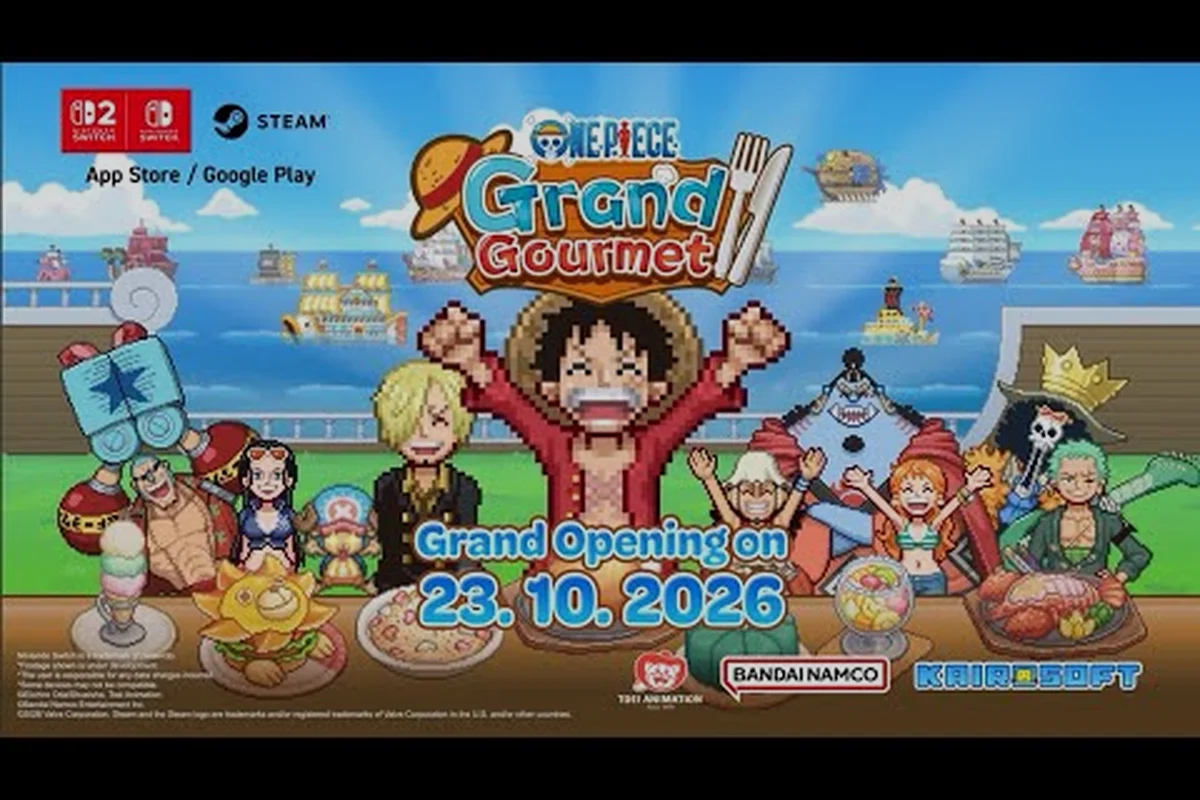
Choosing where to play ONE PIECE: Grand Gourmet platforms is the first real decision you will make before launch day, and the answer shapes how you experience Sanji's culinary adventure. The confirmed lineup spans Nintendo Switch 2, Nintendo Switch, Steam, iOS, and Android, with console versions arriving October 22 and PC plus mobile following on October 23, 2026. Because each version carries different strengths, pricing expectations, and upgrade considerations, understanding the full platform landscape now saves you from buyer's remorse later.
ONE PIECE: Grand Gourmet Platforms Overview and Release Timing
The official announcement from Bandai Namco and ONE PIECE.com confirms a five-platform launch that covers nearly every major gaming ecosystem. Nintendo Switch 2 and Nintendo Switch lead the rollout on October 22, while Steam, Apple App Store, and Google Play follow exactly one day later on October 23. This staggered release means console players get a head start, though the gap is short enough that cross-platform conversations begin almost immediately.
What makes this lineup notable is what is missing. According to the official Bandai Namco product page, Xbox and PlayStation versions have not been announced, and the title does not appear on any Game Pass roadmap as of August 24, 2026. That makes ONE PIECE: Grand Gourmet a Nintendo-first experience with PC and mobile support rather than a true multi-console release.
The platform breakdown matters for practical reasons beyond preference. Each version shares the same 30fps pixel presentation, which the official ONE PIECE.com news page confirms, so you are not choosing between performance tiers. Instead, your decision hinges on portability, save management, controller support, and whether you already own a Switch 1 or plan to adopt the Switch 2.
| Platform | Release Date | Key Strength | Primary Limitation |
|---|---|---|---|
| Nintendo Switch 2 | October 22, 2026 | Next-gen hardware, future-proofing | Higher entry cost, separate purchase |
| Nintendo Switch | October 22, 2026 | Large install base, familiar controls | Aging hardware, no upgrade path |
| Steam (PC) | October 23, 2026 | Steam Cloud, Family Sharing, achievements | Requires PC, partial controller support |
| iOS (App Store) | October 23, 2026 | Play anywhere with phone | Touch controls, smaller screen |
| Android (Google Play) | October 23, 2026 | Flexible device options | Device variability, touch controls |
The language support across all five platforms is identical, which simplifies the decision considerably. The official listing confirms 12 text languages: Japanese, English, French, Italian, German, Spanish, Neutral Spanish, Brazilian Portuguese, Simplified Chinese, Traditional Chinese, Korean, and Thai. Whether you play on Switch 2 or your phone, you get the same localization options, so language availability should not factor into your platform choice.
Nintendo Switch 2 vs Switch 1: What Actually Changes
Steam Deck and Handheld PC Compatibility: 30fps Pixel Presentation in Practice
The 30fps pixel presentation across all platforms means Steam Deck's 800p screen handles the art style well, but the Partial Controller Support category is the catch. Steam Input lets you map touch controls to the Deck's trackpads, yet menus designed for mobile taps may require manual configuration. The Steam Cloud category covers save sync between Deck and desktop, though Family Sharing means only one device plays at a time. For optimal battery life, cap TDP at 10W—the pixel art doesn't need full APU power, extending sessions beyond the Deck's typical 2-hour window on demanding titles.
Switch 2 Cartridge vs Digital: Storage and Save Migration Decisions
The Switch 2 version supports both physical cartridges and digital downloads, but the 30fps pixel presentation means file sizes stay modest—likely under 5GB given the art style. Physical buyers get the advantage of resale value, yet digital pre-orders on the eShop may include early-access bonuses tied to the October 22, 2026 console release date. Save data migration between Switch and Switch 2 uses the same Nintendo Account cloud system, but Steam players cannot transfer progress to console versions—the Single-player category confirms no cross-save infrastructure exists between Steam and Nintendo platforms.
The Switch 2 vs Switch 1 comparison dominates most pre-launch discussions, and for good reason. These are the two console versions, and they are not interchangeable. The critical fact, confirmed by the official platform listing, is that ONE PIECE: Grand Gourmet requires a separate purchase on each system. There is no free upgrade path from the Switch 1 version to the Switch 2 edition, and save data does not transfer between the two consoles.
For players who already own a Switch 1, this creates a genuine dilemma. The Switch 1 version runs the same 30fps pixel presentation as every other platform, so you are not losing visual fidelity by staying on older hardware. The game's art style, which mimics Kairosoft's classic management sims, does not demand next-gen processing power. If you are content with your current console and have no plans to upgrade, the Switch 1 version delivers the complete experience without compromise.
However, the Nintendo Switch 2 edition offers advantages that extend beyond raw performance. The Switch 2's larger screen and improved handheld ergonomics make long restaurant management sessions more comfortable, and the console's faster loading times reduce the friction of moving between your restaurant, adventure maps, and Sanji's kitchen. Community reports from players who tested both versions at preview events suggest the Switch 2 version feels snappier in menu navigation, even if the core gameplay remains identical.
| Comparison Point | Switch 1 | Switch 2 |
|---|---|---|
| Purchase Price | Standard retail price | Standard retail price (separate) |
| Save Transfer | No | No |
| Performance | 30fps pixel presentation | 30fps pixel presentation |
| Loading Times | Standard | Faster (community reports) |
| Screen Size | 6.2" (original) / 7" (OLED) | Larger display |
| Future Proofing | Limited | Ready for upcoming titles |
The upgrade path situation deserves emphasis because it catches many players off guard. If you buy the Switch 1 version and later purchase a Switch 2, you must buy the game again. There is no cross-buy benefit, no discount program, and no save migration tool. This is a deliberate publishing decision that mirrors how Bandai Namco has handled other multi-generation releases, but it still frustrates players who expected continuity.
That said, the Switch 2 version is not a graphical overhaul. Both consoles render the same pixel art at the same frame rate, so the decision comes down to hardware preference and future plans. If you already own a Switch 2 or intend to buy one within the next year, purchasing the Switch 2 edition is the smarter investment. If you are happy with your Switch 1 and do not see an upgrade in your near future, the Switch 1 version offers identical gameplay at a lower barrier to entry.
Steam, iOS, and Android: The Non-Nintendo Options
The Steam version of ONE PIECE: Grand Gourmet brings several features that console players do not get, and the Steam store page lists them clearly. Steam Achievements give completionists a structured goal system, while Steam Cloud ensures your save follows you across devices. The listing also confirms Family Sharing, which lets household members play your copy without purchasing it separately, and Partial Controller Support, meaning you can use a gamepad for most functions but may need keyboard or mouse for certain menus.
For PC players, the Steam version is the obvious choice, especially if you already use the platform for other Kairosoft-style management games. The ability to alt-tab between your restaurant and reference guides, combined with Steam's screenshot and recording tools, makes it the most flexible way to play. The partial controller support is worth noting, though. If you prefer playing on a controller, you can, but expect to reach for your mouse occasionally.
Mobile players get the most portable experience, but they also accept certain trade-offs. The iOS and Android versions use touch controls, which work well for a management sim that relies on tapping menus and dragging ingredients. The smaller screen means less visible restaurant space at once, though the pixel art style scales reasonably well. Battery life is a consideration for long sessions, and mobile notifications can interrupt your flow unless you enable focus mode.
| Feature | Steam | iOS | Android |
|---|---|---|---|
| Achievements | Yes (Steam Achievements) | No | No |
| Cloud Saves | Yes (Steam Cloud) | Platform-dependent | Platform-dependent |
| Controller Support | Partial | No | No |
| Family Sharing | Yes | No | No |
| Offline Play | Yes | Yes | Yes |
The single-player structure applies to every platform equally. The official listing confirms ONE PIECE: Grand Gourmet is single-player only, with no co-op or online multiplayer modes. This actually simplifies your platform choice because you do not need to coordinate with friends or worry about player populations. The experience is identical whether you play on Switch 2, Steam, or your phone, which makes personal convenience the deciding factor.
For players who travel frequently or play during commutes, mobile is hard to beat. The ability to check on your restaurant, send crews on ingredient voyages, and develop new recipes with Sanji from anywhere adds a layer of convenience that stationary platforms cannot match. The trade-off is the absence of achievements and the smaller interface, but for casual sessions, mobile works beautifully.
Cross-Platform Considerations and Save Management
One of the most common questions about ONE PIECE: Grand Gourmet platforms involves cross-progression, and the answer requires clarity. There is no cross-save functionality between different platforms. Your progress on Switch 2 stays on Switch 2, your Steam save stays on Steam, and your mobile progress stays on your phone. This is confirmed by the platform listing, which shows no cross-save or cross-buy features.
This limitation matters more than it might first appear. If you start on mobile to test the game and later want to commit to the Switch 2 edition, you restart from the beginning. The same applies if you buy the Steam version for your desktop and wish you had purchased the Switch 2 edition for portability. Your time investment does not transfer, so choose your primary platform carefully before sinking hours into the game.
The save management strategies differ by platform. Steam Cloud handles backups automatically, which is a significant advantage for PC players. Switch 2 and Switch 1 rely on Nintendo's cloud save system, which requires a Nintendo Switch Online subscription. Mobile platforms typically back up to your account (Apple ID or Google account), but the reliability varies by device and operating system version.
| Platform | Save Backup Method | Requires Subscription | Cross-Platform Transfer |
|---|---|---|---|
| Switch 2 | Nintendo Switch Online cloud saves | Yes | No |
| Switch 1 | Nintendo Switch Online cloud saves | Yes | No |
| Steam | Steam Cloud (automatic) | No | No |
| iOS | iCloud / Apple ID backup | No | No |
| Android | Google Play Games backup | No | No |
The lack of cross-platform saves is not unusual for Kairosoft-style games, and it reflects the developer's focus on self-contained experiences. However, it does mean that your platform choice is effectively permanent for each playthrough. If you want to experience the game on multiple platforms, plan to run separate playthroughs with different goals, such as a completionist run on Steam and a casual run on mobile.
The Nintendo Switch Online requirement is another factor to weigh. While you can play ONE PIECE: Grand Gourmet without a subscription, cloud saves on Switch 2 and Switch 1 require an active membership. If you do not subscribe, your save lives only on your console's internal storage. This is standard for Nintendo platforms, but it is worth remembering if you are deciding between Switch and Steam, where cloud saves are free.
Which Platform Should You Choose? Practical Recommendations
Language Coverage and Region-Specific Storefronts: The 12-Language Breakdown
The 12 text languages include Neutral Spanish and Brazilian Portuguese separately, plus both Simplified and Traditional Chinese—critical for Asian market distribution. Japanese, English, French, Italian, German, and Spanish cover the primary European territories, while Korean and Thai round out the list. Notably absent is Russian or Turkish, which may push players toward English versions in those regions. The Steam storefront lists all 12 languages in its metadata, but the App Store and Google Play versions may restrict language options based on device region settings, so players traveling between regions should verify their installed language pack before starting a save.
Mobile Version Monetization and Offline Play: App Store and Google Play Differences
The mobile versions on App Store and Google Play share the October 23, 2026 release date, one day after consoles, but monetization may differ. The official site lists no microtransaction details, yet the Steam categories exclude In-App Purchases, suggesting mobile versions might include them to offset platform fees. Offline play is confirmed for Single-player mode, but Google Play's offline caching differs from Apple's local storage—Android users should pre-download the full game over Wi-Fi to avoid mid-restaurant interruptions. The 30fps cap ensures older phones handle the pixel art without thermal throttling, though iOS devices with ProMotion displays will still output at the locked 30fps.
Your ideal platform depends on your gaming habits, hardware ownership, and how you plan to engage with the game. The good news is that every version delivers the same core experience, so there is no wrong answer, only different trade-offs. Here is a practical breakdown based on common player profiles.
Choose Nintendo Switch 2 if you already own the console or plan to buy it soon. The Switch 2 edition offers the best long-term value because it future-proofs your purchase, and the faster loading times improve the overall flow of restaurant management. This is the version to buy if you want the definitive Nintendo experience without worrying about a future upgrade.
Choose Nintendo Switch 1 if you own the console and have no immediate plans to upgrade. The game runs identically to the Switch 2 version, and you save money by not purchasing new hardware. This is the budget-conscious choice for players who are satisfied with their current setup.
Choose Steam if you value achievements, cloud saves, and the flexibility of playing on PC. The Steam Achievements and Steam Cloud features add structure and security that console versions lack, and Family Sharing lets household members play without extra purchases. This is the best choice for completionists and PC-centric players.
Choose mobile if portability is your priority. The ability to play anywhere makes mobile the most convenient option, and the touch controls work well for this genre. This is the best choice for casual players who want to check in on their restaurant during breaks or commutes.
| Player Profile | Recommended Platform | Primary Reason |
|---|---|---|
| Switch 2 owner | Switch 2 | Future-proof, faster loading |
| Budget-conscious Switch 1 owner | Switch 1 | Identical gameplay, no new hardware |
| PC gamer / completionist | Steam | Achievements, cloud saves, Family Sharing |
| Commuter / casual player | Mobile (iOS or Android) | Portability, quick sessions |
| Multi-platform enthusiast | Steam + Mobile | Different playthroughs for different contexts |
The price considerations also play a role, though exact pricing varies by region. The official pricing coverage breaks down regional costs, and the general pattern shows console versions at standard retail pricing while mobile versions may offer a lower entry point. If budget is your primary constraint, mobile is likely the most affordable way to experience the game.
Whichever platform you choose, the game itself remains the same charming, deep restaurant management sim that Kairosoft fans have been anticipating. The platform decision is about matching the game to your lifestyle, not about getting a better version of the game. Take stock of your hardware, your habits, and your budget, and the right choice becomes clear.
Frequently Asked Questions
Is ONE PIECE: Grand Gourmet on Xbox or PlayStation?
No. As of August 24, 2026, the official Bandai Namco listing confirms only Nintendo Switch 2, Nintendo Switch, Steam, iOS, and Android versions. Xbox and PlayStation have not been announced, and the game is not on the Game Pass roadmap. If you only own those consoles, you will need to wait for a potential future announcement.
Can I transfer my save from Switch 1 to Switch 2?
No. ONE PIECE: Grand Gourmet does not support save transfers between Switch 1 and Switch 2. The two versions are separate purchases with independent save files. If you upgrade consoles, you must start a new playthrough. This applies to all platforms, as there is no cross-save functionality anywhere in the game.
Does the Steam version support controllers?
Yes, but partially. The Steam listing confirms Partial Controller Support, meaning you can use a controller for most gameplay functions. Some menus or interface elements may require keyboard or mouse input. If you prefer playing exclusively with a controller, the Switch 2 or Switch 1 versions offer a more consistent experience.
Is ONE PIECE: Grand Gourmet a single-player game on all platforms?
Yes. Every platform version is single-player only, with no co-op or online multiplayer modes. The official listing confirms this across all five platforms. This means you do not need to worry about player populations or online subscriptions for gameplay, though Switch cloud saves do require a Nintendo Switch Online membership.
Which platform has the best performance?
All platforms run the same 30fps pixel presentation, so visual performance is identical. The practical differences come down to loading times and interface responsiveness. Community reports from preview events suggest the Switch 2 version loads faster and feels snappier in menus, while Steam benefits from your PC's hardware. Mobile performance varies by device.